
Back-to-Back Orders using Magento 2 Purchase Management
Streamlined Ordering with Purchase Management Module
Back-to-back ordering is a critical workflow for Magento 2 merchants who do not stock inventory upfront. In this model, purchase orders are created only after a sales order is placed, ensuring minimal stock risk. This article explains how Magento 2 back-to-back orders work in practice and how they can be automated.
Managing inventory effectively while fulfilling customer orders on time is a major challenge for growing eCommerce businesses. AgileCodex’s Magento 2 Purchase Management helps streamline back-to-back ordering by automating procurement, supplier coordination, and stock updates within Magento 2.
What is Back-to-Back Ordering?
Back-to-back ordering directly links sales orders to purchase orders. With this feature enabled, each customer order automatically triggers a corresponding purchase order for the supplier, ensuring that products are procured just in time to meet customer demand. This streamlined process helps maintain optimal inventory levels while enhancing order fulfillment efficiency. For understanding Back-to-Back Ordering for Efficient Inventory Management, please visit the Demo site with Purchase Management Module.
How Does it Work?
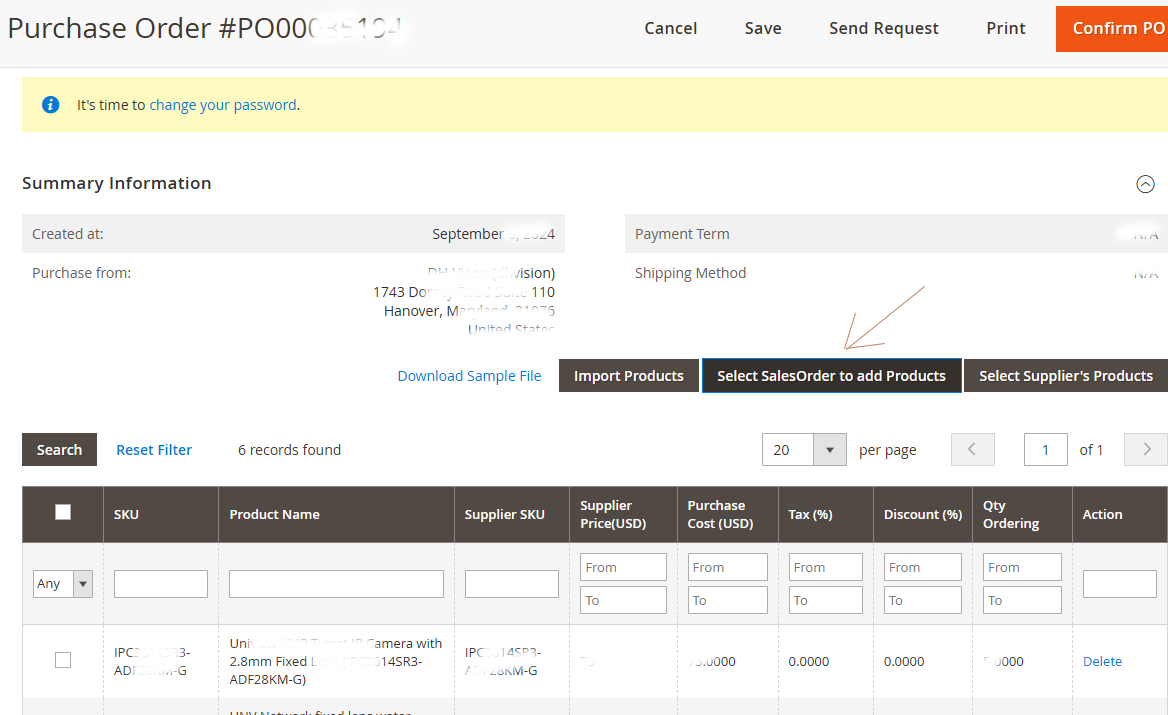
From the Magento admin, you can easily create a purchase order from an existing sales order:
- Select Sales Order Products: After creating a purchase order, click on the “Select Sales Order to add Products” button. This allows you to select items from previous customer sales orders to add to the purchase order.
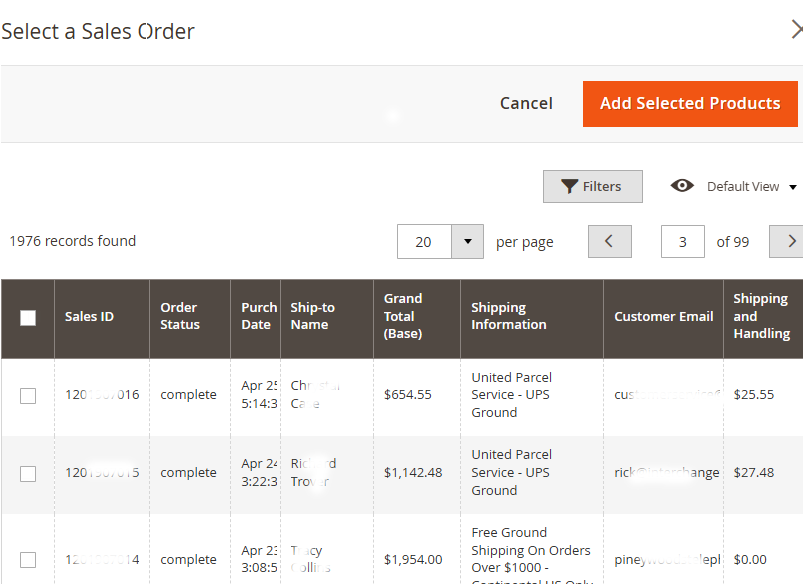
- Add Sales Order Items to Purchase Order: A list of sales orders will appear, enabling you to pick the products you need from the selected orders. Once chosen, click “Add Selected Products,” and these items are automatically added to your purchase order for the supplier.
This method optimizes inventory levels by reducing excess stock and ensuring timely order fulfillment, improving customer satisfaction and reducing costs.
Typical Back-to-Back Order Workflow in Magento 2
With the Magento 2 Purchase Management extension, each customer order can automatically generate supplier-specific purchase orders. This back-to-back workflow helps you avoid overstocking while still fulfilling orders on time.
- Customer places a sales order in Magento 2 (storefront or admin).
- The system identifies products that require supplier fulfillment (e.g., out of stock or drop-ship items).
- Purchase orders are generated for the relevant suppliers using Magento 2 Purchase Management.
- Suppliers confirm availability, lead time, and pricing for the ordered items.
- Goods are received into stock and inventory is updated automatically in Magento 2.
- The original sales order is fulfilled, packed, and shipped to the customer.
You can explore this workflow in a real environment on our Purchase Management demo site or review configuration details in the Purchase Management user guide.
Why Back-to-Back Ordering Works Well with Purchase Management
- Automated synchronization: Sales orders and purchase orders remain aligned automatically, reducing manual work and minimizing fulfillment errors.
- Controlled inventory flow: Products are purchased only when customer demand exists, helping avoid overstocking and unnecessary capital lock-up.
- Flexible supplier handling: Merchants can selectively include sales order items in purchase orders using practical filters and search tools.
By supporting back-to-back ordering natively, AgileCodex’s Magento 2 Purchase Management helps merchants maintain a consistent flow between sales, purchasing, and inventory without adding operational complexity.
-
 Magento 2 Purchase Management
As low as $199.00 Regular Price $299.00
-
 Advanced Inventory & Warehouse Management for Magento 2
As low as $249.00 Regular Price $399.00
-
 Advanced Sales Management for Magento 2
As low as $199.00
-
 Advanced Invoice & Shipment for Magento 2
As low as $249.00
-
 Payment or Deposit for Magento 2
As low as $249.00