

User Guide (Manual) for Payment or Deposit Module for Magento 2
Features of Payment or Deposit for Magento 2
Enhance your Magento 2 store by managing deposits, partial payments, and due invoices. Record payments without forcing invoice creation and apply deposits accurately to future invoices.
- Total Deposit Tracking: Record deposit payments directly from the order without creating invoices.
- Apply Deposited Amount: Checkbox under Payment Method to apply full, partial, or no deposit amount during invoice creation.
- Accurate Due Calculation: Order’s Total Due = Grand Total – Total Deposit.
- Offset Deposits: Deposits adjust automatically when invoice quantities are updated.
- Separate Payment Records: Keep deposits independent from invoice payments for better accounting traceability.
- QuickBooks Compatibility: Works like QuickBooks — invoices record transactions, while deposits record payments separately.
- Multiple Deposits Support: Handle multiple deposit payments on the same order, before invoicing.
- Hide/Adjust Paid Totals: Option to remove or adjust Magento’s default “Total Paid” if it conflicts with deposit tracking.
- Standard Accounting Compliance: Ensures invoices and deposits align with accrual-based accounting rules.
Recording Payments as Deposits
Use the payment form in sales orders to record deposits without generating an invoice. These deposits reduce the balance due later.
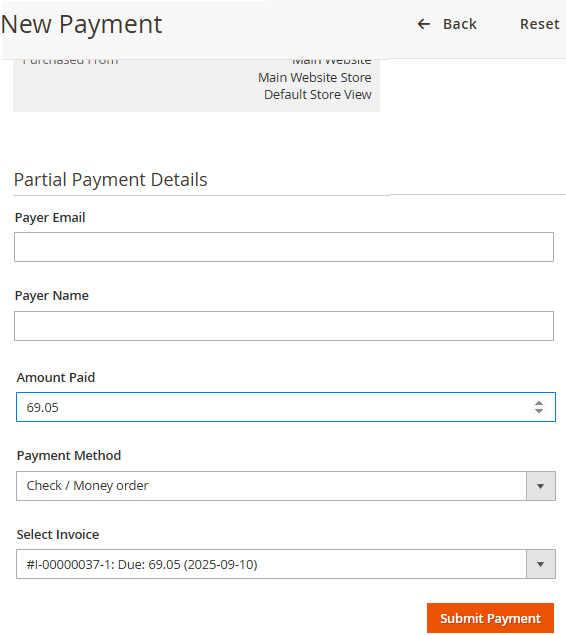
Deposit Features
- Record payments without forcing invoice generation.
- Track all deposits under the order before invoicing.
- Maintain clear distinction between deposit and invoice payments.
- Supports advance payments and installment workflows.
- Keeps order balances accurate for both customer and accounting.
Invoice Creation with Deposits
When creating invoices, deposits can be applied fully, partially, or not at all. The “Apply Deposited Amount” checkbox ensures maintainability by appearing under the Payment Method section.
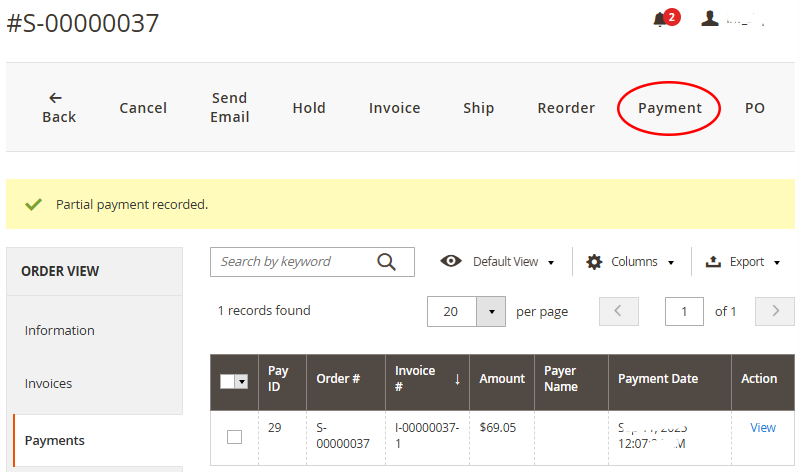
Invoice → Deposit Application
- Checkbox to Apply Deposited Amount under Payment Method.
- Automatically adjusts due total by subtracting applied deposits.
- Works even when multiple invoices are created per order.
Grand Total:   $500.00
Deposit Paid:  $200.00
Invoice Due:   $300.00
Order Totals & Accounting View
Order totals reflect deposits and invoices clearly to align with proper accounting practices and QuickBooks workflows.
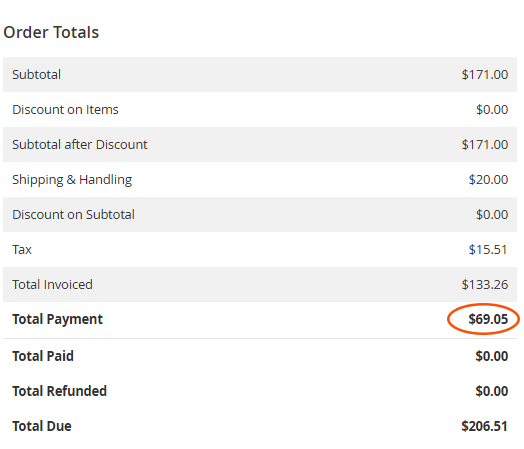
Totals Breakdown
- Grand Total: Full order amount including tax and shipping.
- Total Deposit: Payments received but not yet invoiced.
- Balance Due: Grand Total – Total Deposit.
- Prevents incorrect auto-payment records in Magento core.
- Keeps invoices aligned with QuickBooks or external accounting software.
- Improves B2B deposit workflows and partial payment handling.