

User Guide (Manual) for Advanced Sales Extension
Features of Advanced Sales Management
- Create Quotes from Admin: Generate quotes directly from the Magento admin panel and assign them to customers.
- Convert Quotes to Orders: Seamlessly convert approved quotes into Magento sales orders with preserved pricing and discounts.
- Custom Discounts: Apply fixed or percentage-based discounts on products or the entire quote.
- Partial Payments: Collect deposits or partial payments against a quote before processing the full order.
- Quote Number Synchronization: Maintain consistent quote and order numbering without conflicts.
- Support for Out-of-Stock Products: Add backordered or pre-order items to quotes.
- Quote Tracking & History: Keep a full log of updates, negotiations, and communications within each quote.
- Customer Fields: Support VAT Number, Purchase Order (PO) number, and custom notes for tax compliance and communication.
- Printable Quotes: Export and share professional quote PDFs with customers.
SALES PLUS CONFIGURATION
The Sales Plus Configuration module allows administrators to set advanced options for sales orders, discounts, and order processing workflows. This ensures your sales system is tailored to your store’s needs.
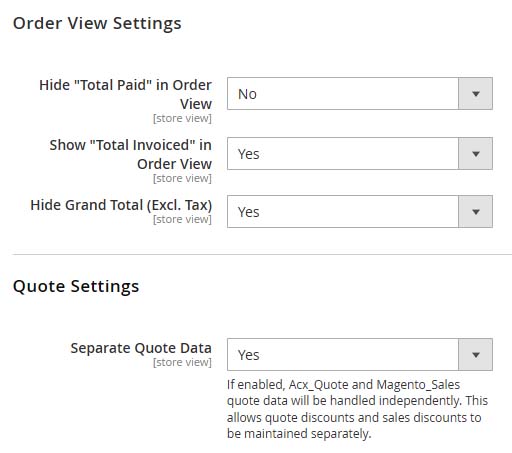
- Enable or disable advanced discount features for sales orders.
- Configure default settings for tax, shipping, and invoice rules.
- Control how sales orders interact with quotes and customer data.
- Customize the order workflow to match your business processes.
- Improves flexibility in sales order management.
- Ensures consistency with store-specific policies and procedures.
- Reduces errors in complex order workflows.
- Enhances productivity of sales and administrative teams.
CONVERT QUOTE TO SALES
The Convert Quote to Sales feature enables administrators to seamlessly transform approved quotes into sales orders. This simplifies order management by reducing manual entry and ensuring data consistency.
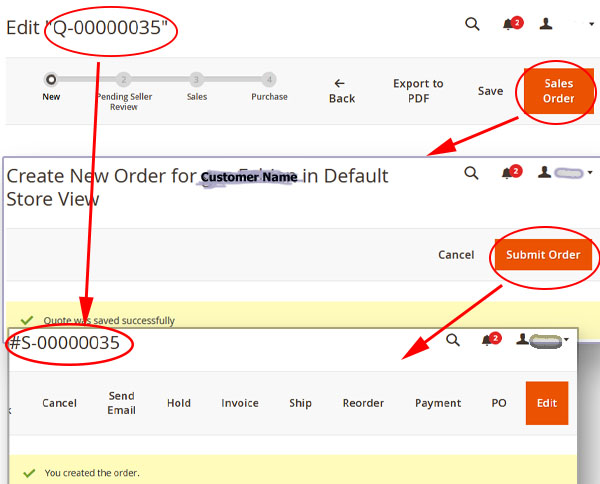
- Select a quote from the list and convert it directly into a sales order.
- Automatically copies customer details, items, and discounts from the quote.
- Maintains the original quote reference for tracking purposes.
- Reduces manual errors and accelerates order fulfillment.
- Saves time by reducing duplicate data entry.
- Ensures accurate transfer of quote details into orders.
- Improves workflow efficiency for the sales team.
SALES ITEM LIST
The Sales Item List provides a detailed overview of all items included in a sales order. Administrators can view, edit, or manage item-level details directly from this interface.
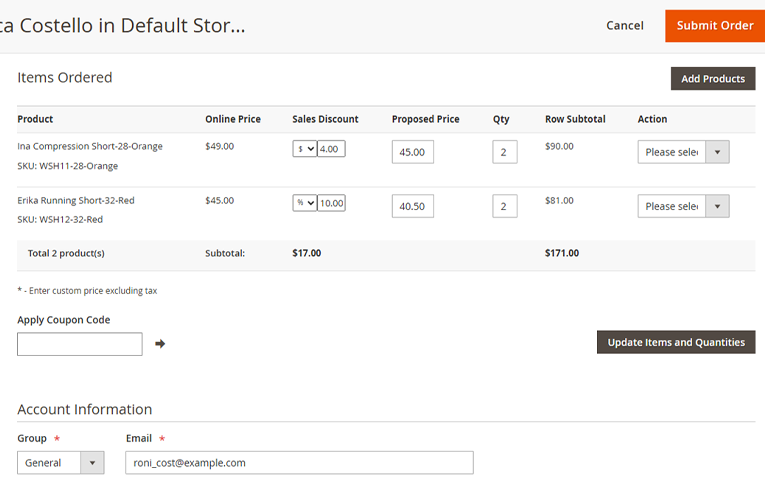
- Displays product name, SKU, quantity, and price for each item.
- Allows inline editing of quantity or price adjustments.
- Supports custom options, discounts, and tax calculations.
- Improves accuracy of sales order data before final submission.
- Ensures clarity and transparency in order item details.
- Minimizes errors in sales order processing.
- Streamlines workflow for sales and accounting teams.
SALES TOTALS
The Sales Totals section summarizes the total amounts for a sales order, including item subtotals, discounts, taxes, and grand total. It provides a complete financial overview at a glance.
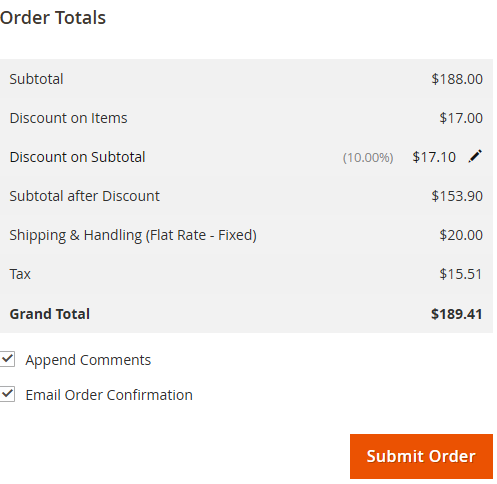
- Displays subtotal, applied discounts, taxes, and grand total.
- Updates automatically when order items or discounts are modified.
- Supports multiple tax rates and currency formatting.
- Provides accurate total for invoicing and reporting purposes.
- Offers a clear financial summary for each sales order.
- Reduces manual calculation errors.
- Improves order review and approval processes.