
Features of Advanced Invoice & Shipment
Flexible invoicing and shipment flows for accurate accounting — create invoices with or without payment, shipments with or without invoice, and correct due/total calculations.
- Create Invoice without Payment: Businesses often need to create an invoice without recording an immediate payment. In core Magento, creating an invoice automatically marks the amount as paid. With Advanced Invoice & Shipment Module , creating an invoice without payment will not affect the sales order’s paid amount.
- Enforce Invoice with Due from Shipment: Optionally require creating an invoice (with due) when creating a shipment from the shipment form.
- Include Shipping Charge Checkbox: Add a checkbox on invoice creation to include the shipping fee with that invoice. If unchecked, the first invoice is created without the shipping charge.
- Fix Invoice Totals & Grand Total: Correct calculation of invoice totals (with or without shipping) so Paid / Due / Grand Total reflect standard accounting practice.
- Prevent Duplicate Shipping Fee: Fix the issue where shipping fee is being added twice when invoices are created from the shipment form.
- Automatic Payment Prevention: Avoid creation of unwanted automatic payments when invoice created from shipment misses tax in due amount — ensure Tax is included in Due when invoice is full due.
- Shipment Numbering: Shipment (delivery note / packing slip) should use the same invoice-based numbering (for example T1001-1, T1001A) while allowing the template to show no prices when needed.
- Invoice Number Format: Tax Invoice prefix should be
T(e.g.T1001) to avoid confusion with the digit 1 inI1001. Confirm compatibility with QuickBooks or accounting software for numbers likeT1001-1. - Shipment Form without Prices: Allow generating a delivery note / packing slip that does not show prices.
- Print Invoices & Shipment Slips: Add print capability for invoices and shipment/delivery notes directly from admin screens.
- Multiple Invoices per Order: Support splitting order into multiple invoices while maintaining correct totals, payments, and numbering.
Invoice Creation from Shipment
When creating shipments from the shipment form administrators can choose whether to create an invoice alongside the shipment. Our extension adds:
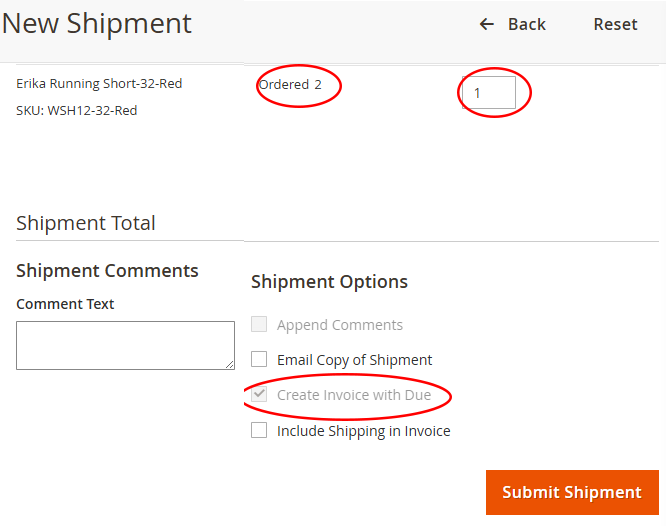
Shipment → Invoice Behavior
- Checkbox to Include Shipping Fee when creating invoice from shipment (if unchecked, shipping is left for later invoice).
- Option to create shipment without generating any invoice or payment entry.
- If an invoice is created automatically, ensure the Due amount includes applicable taxes so automatic payments are not incorrectly created.
- Prevents incorrect payment entries and accounting mismatches.
- Supports partial invoicing workflows and multiple shipments per order.
Invoice Creation & Payment Records
Invoice creation must correctly update payment records so Paid / Due / Outstanding values remain accurate across multiple invoices and shipments.
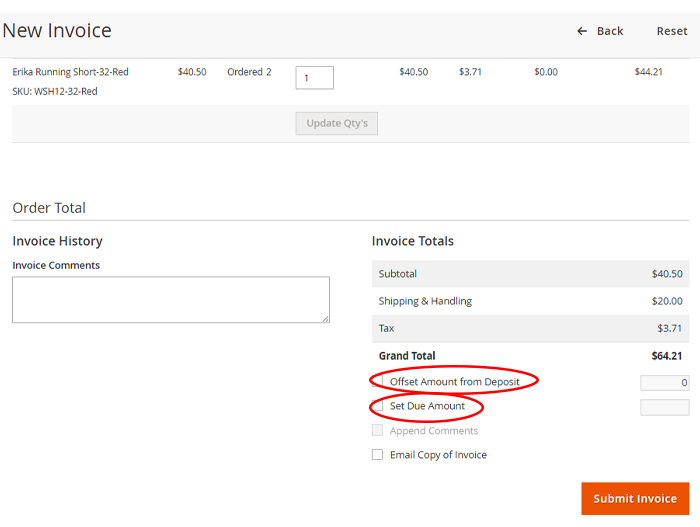
Invoice → Payment Rules
- Paid invoice should increase the payment record; payment rows must include Invoice # and Order # for traceability.
- Fix duplicate shipping fee additions when invoices are created from shipment.
- Ensure tax is included in Due when invoice is created as full due so automatic payment creation (if present) uses the correct amount.
Invoice Status        Amount Due   Paid
I-00000089-1          $112.50      $112.50
I-00000089-2          $37.10       $92.00
Order Totals & Due Calculation
Totals should follow standard accounting practice. Read more about the Advanced Invoice & Shipment Extension.
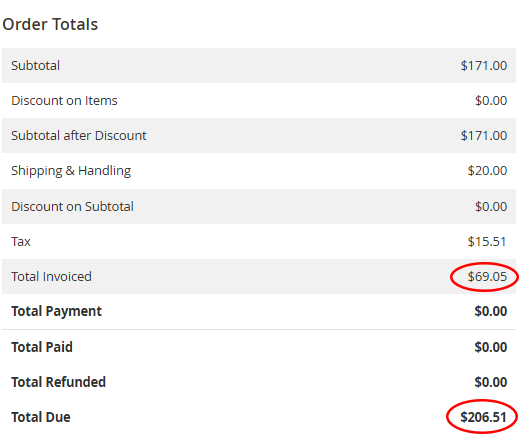
Definitions
- Invoice Total / Grand Total: Full amount owed, including tax, shipping and adjustments.
- Paid Amount: Amount customer has already paid toward that invoice.
- Balance Due / Outstanding Amount: Grand Total − Paid Amount — what the customer still owes.
- Ensure multiple invoices reduce the outstanding balance correctly.
- Make invoice numbering consistent and compatible with external accounting systems (e.g., QuickBooks).
page.