
Magento 2 QuickBooks Online Integration
Connect Magento 2 with QuickBooks Online and automate the synchronization of customers, products, orders, invoices, quotes, payments, and credit memos from your Magento admin workflow.
The AgileCodex QuickBooks Online Integration module helps reduce manual accounting work, improves sync visibility, and gives administrators better control through queue processing, payment mapping, tax mapping, and connection status monitoring.
Who This Module Is For
This integration is designed for Magento 2 store owners, ecommerce managers, accountants, and administrators who use QuickBooks Online and want to reduce repetitive manual entry between Magento sales operations and accounting records.
Key Features of QuickBooks Online Integration
- QuickBooks Online OAuth Connection: Connect Magento with QuickBooks Online using Intuit app credentials.
- Sandbox and Production Modes: Configure and test the integration before connecting live company data.
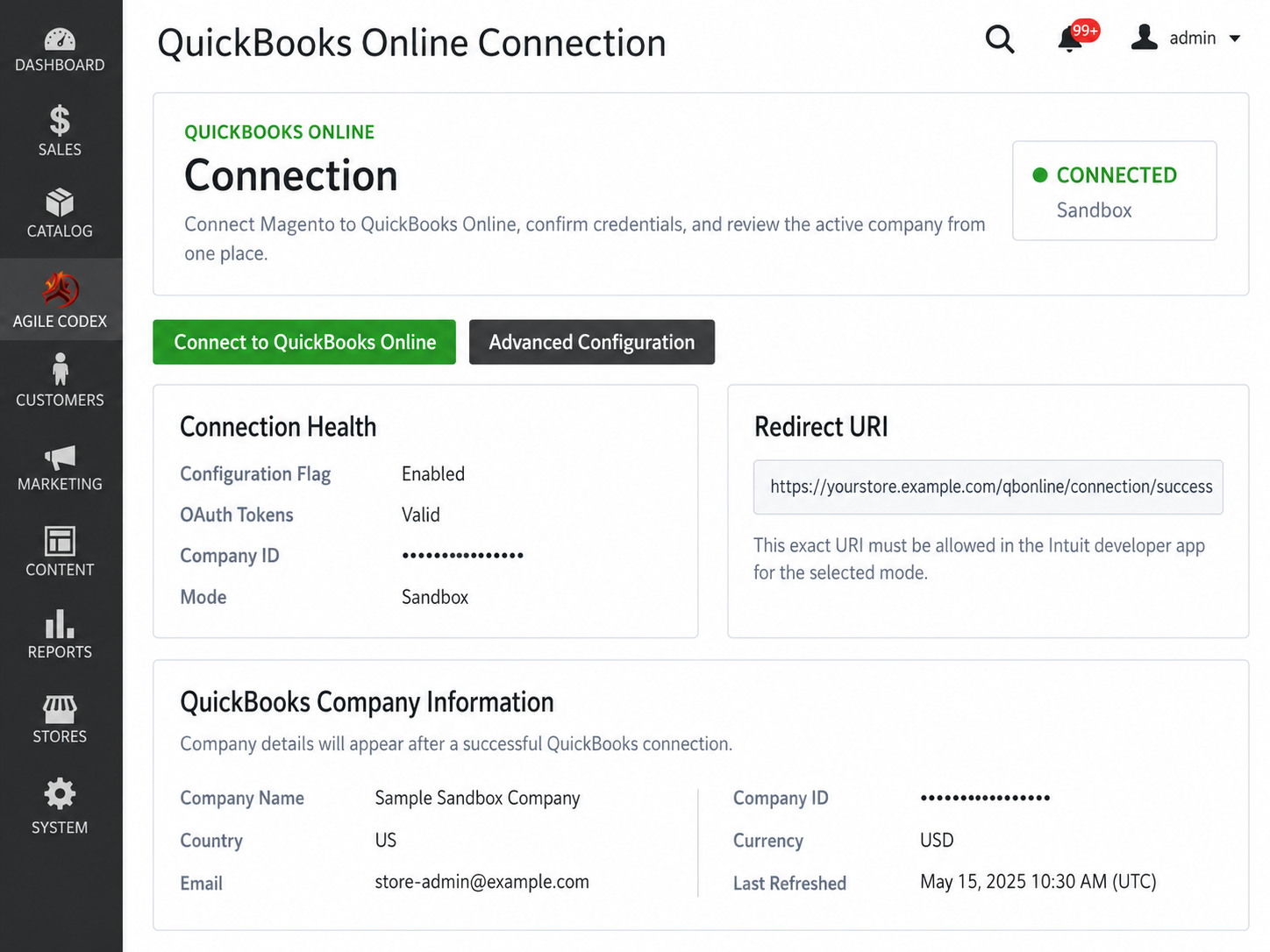
- Connection Dashboard: View connection status, active mode, token health, credential readiness, and company details.
- Order and Invoice Sync: Send Magento order and invoice data to QuickBooks Online.
- Quote and Payment Sync: Support quote and payment synchronization for accounting and sales workflows.
- Customer and Product Sync: Prepare customers and products before sales documents are synchronized.
- Credit Memo Sync: Synchronize refund and credit memo records for better financial traceability.
- Queue-Based Sync: Process QuickBooks API tasks through a queue for safer background synchronization.
- Payment Method Mapping: Map Magento payment methods to QuickBooks payment methods and deposit accounts.
- Tax Code Mapping: Map Magento tax rates to QuickBooks tax codes before syncing financial documents.
- Advanced Sync Behavior: Choose immediate, queue, or cron-based sync behavior for different record types.
- Debug and Diagnostics: Enable logging when troubleshooting QuickBooks API or sync issues.
CONNECTION DASHBOARD
The QuickBooks Online connection dashboard gives administrators a clear overview of the integration status. Instead of checking multiple configuration fields, store admins can quickly see whether the module is connected and ready to sync data.
- Connection Status: View whether QuickBooks Online is connected or disconnected.
- Active Mode: Confirm whether the module is using Sandbox or Production mode.
- Credential Readiness: Check whether the required app credentials are configured.
- Token Health: Review OAuth token status after connection.
- Company Details: Display QuickBooks company information after successful authorization.
CONNECTION CONFIGURATION
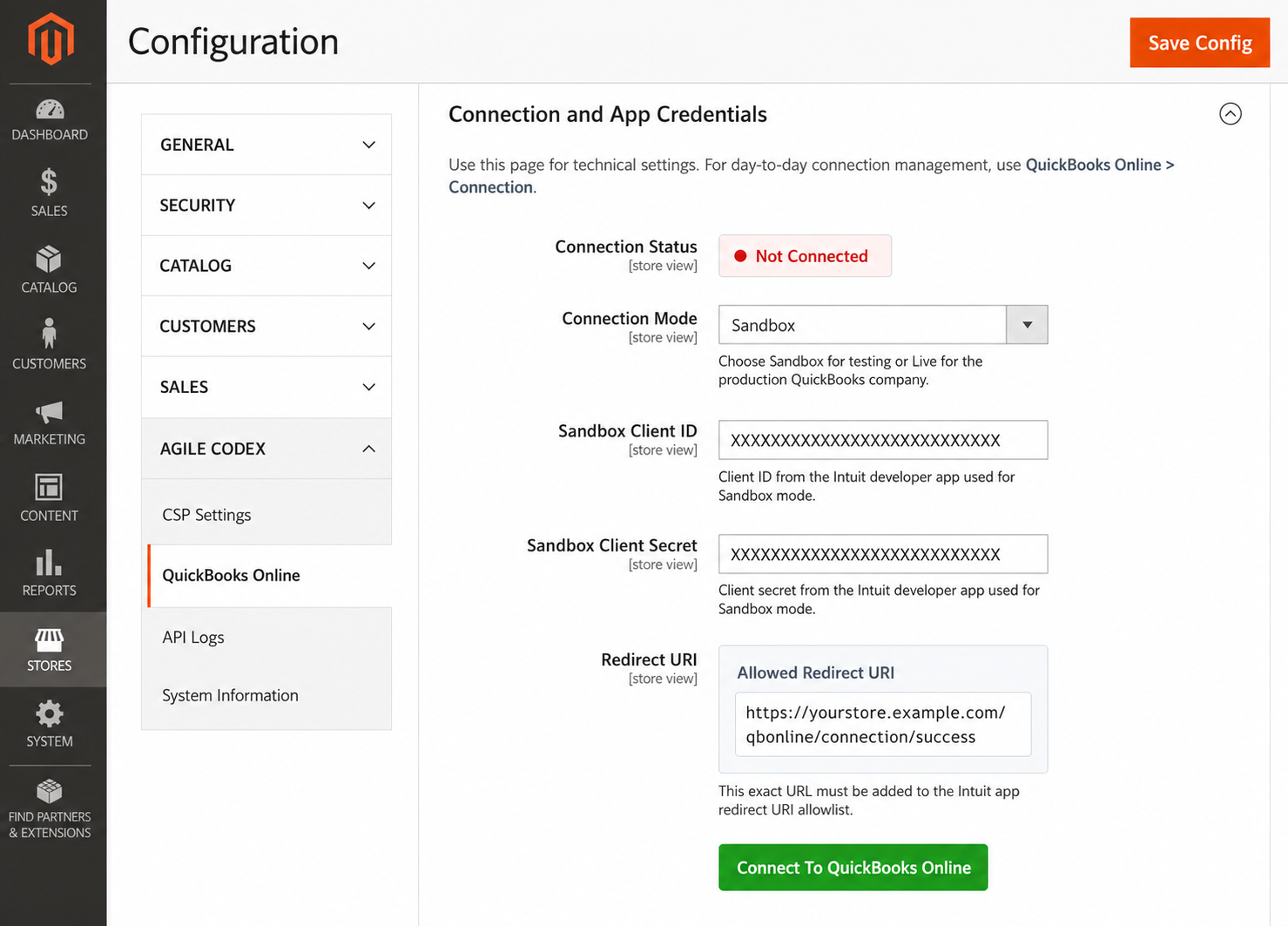
Configure the QuickBooks Online integration from Magento admin by adding your Intuit app Client ID, Client Secret, connection mode, and redirect URI details.
- Sandbox Mode: Test the integration with QuickBooks sandbox data.
- Production Mode: Connect the module to a live QuickBooks Online company.
- Client ID and Client Secret: Store the required Intuit app credentials.
- Redirect URI: Use the Magento-generated callback URL in your Intuit app settings.
- Connect / Disconnect: Manage the QuickBooks Online authorization state from admin.
QUICKBOOKS APP API KEYS
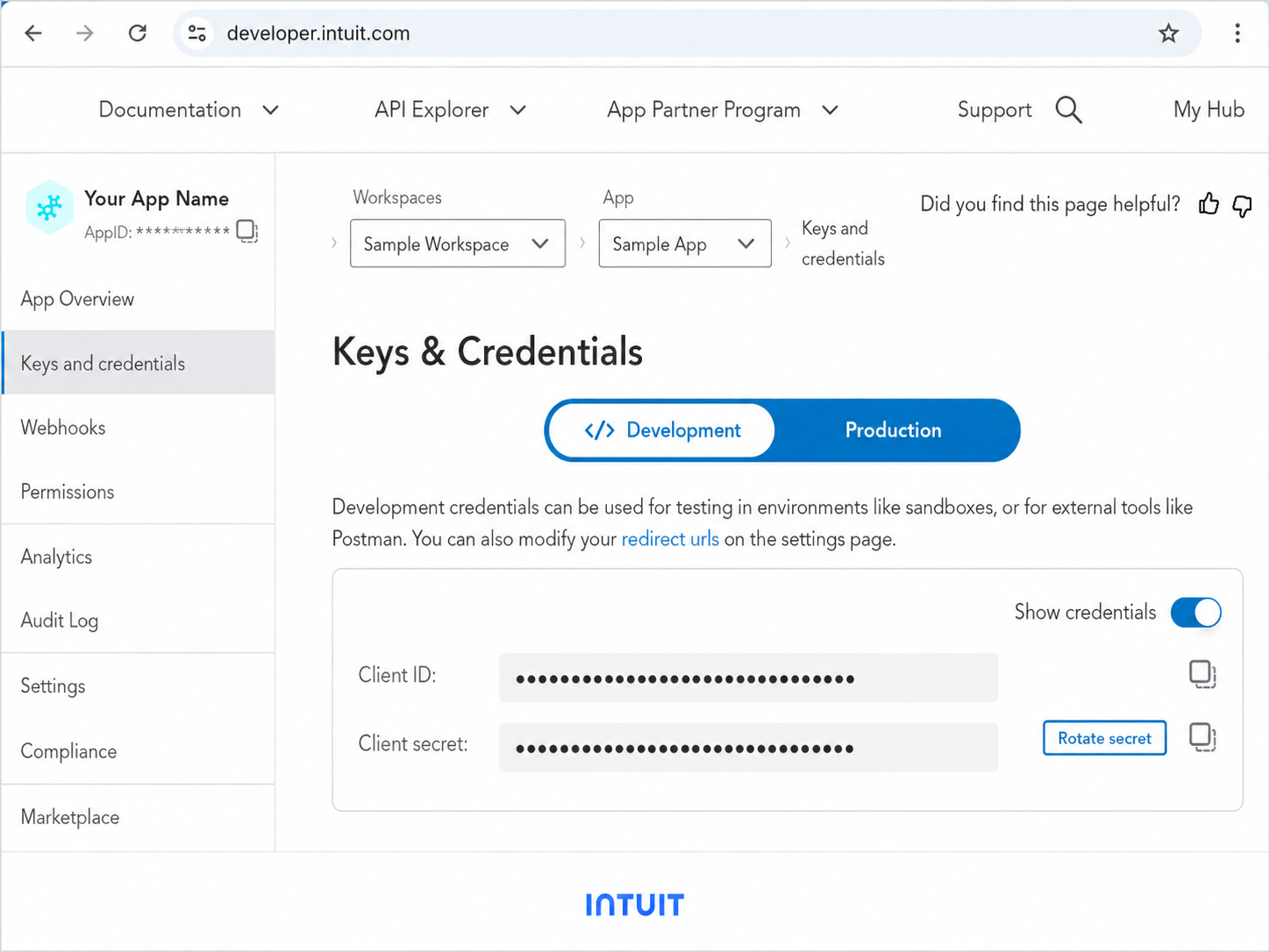
QuickBooks Online uses Intuit app credentials to authorize Magento. The Client ID and Client Secret from your Intuit Developer app must be copied into the Magento configuration.
- Development Keys: Use for sandbox testing.
- Production Keys: Use for live QuickBooks Online companies.
- Secure Setup: Keep app credentials private and only enter them in the Magento admin configuration.
QUICKBOOKS REDIRECT URI SETUP
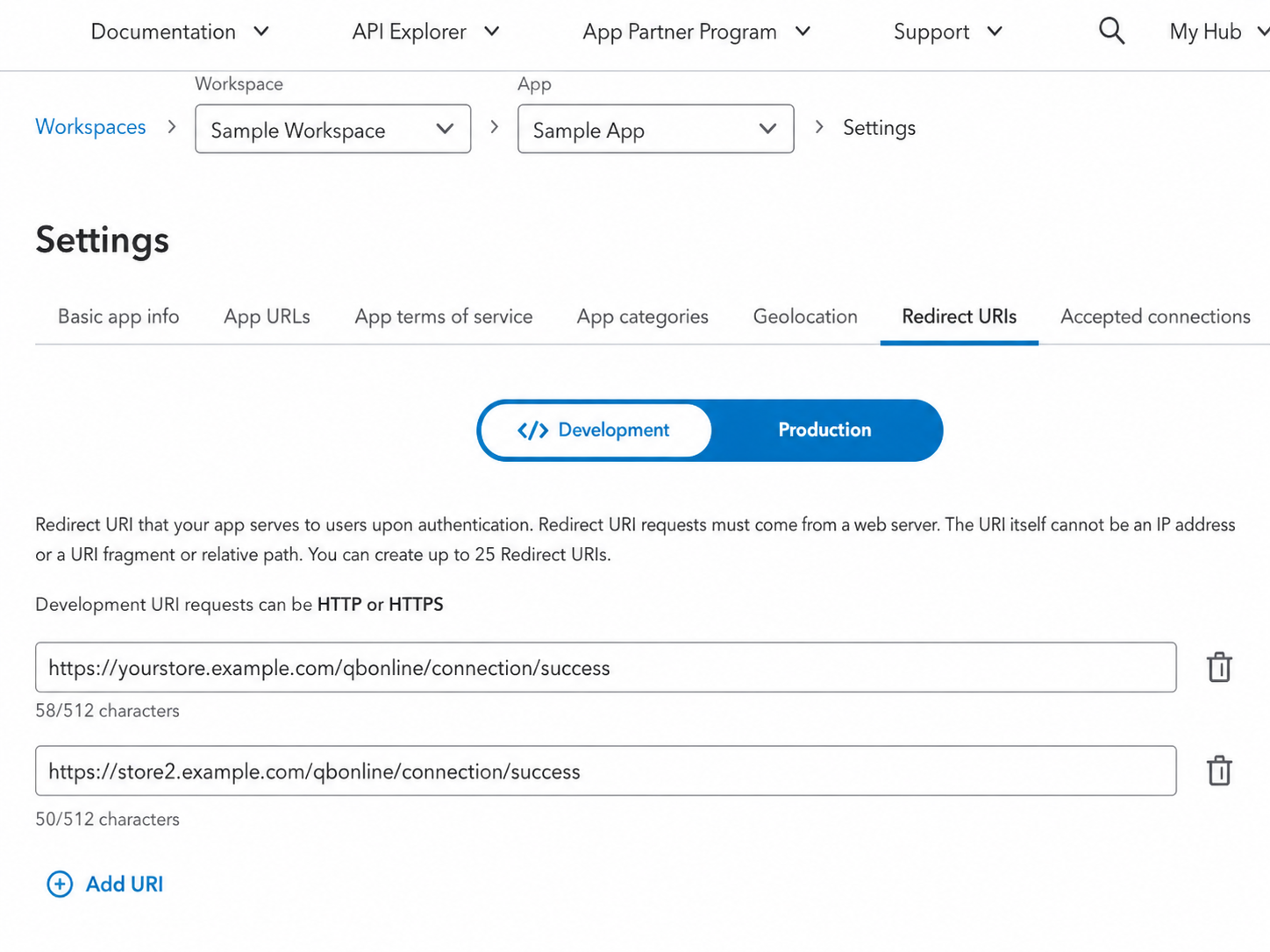
The redirect URI is required for QuickBooks OAuth authorization. The same redirect URI shown in Magento must be added to your Intuit Developer app.
- Exact URL Match: The Redirect URI must match between Magento and Intuit.
- OAuth Callback: QuickBooks redirects back to Magento after authorization.
- Connection Flow: The module stores the authorization result after successful connection.
CONNECTED AND DISCONNECTED STATES
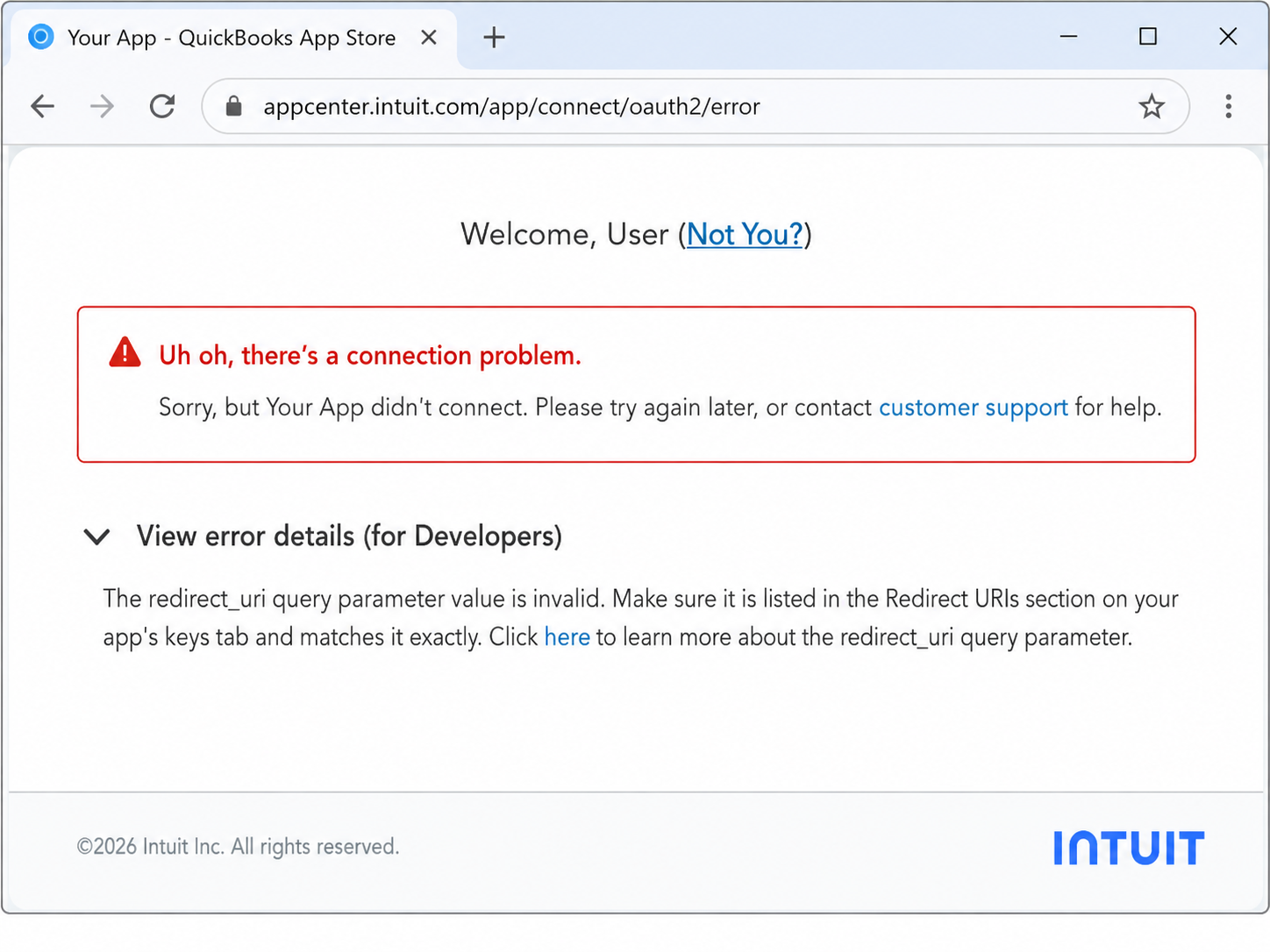
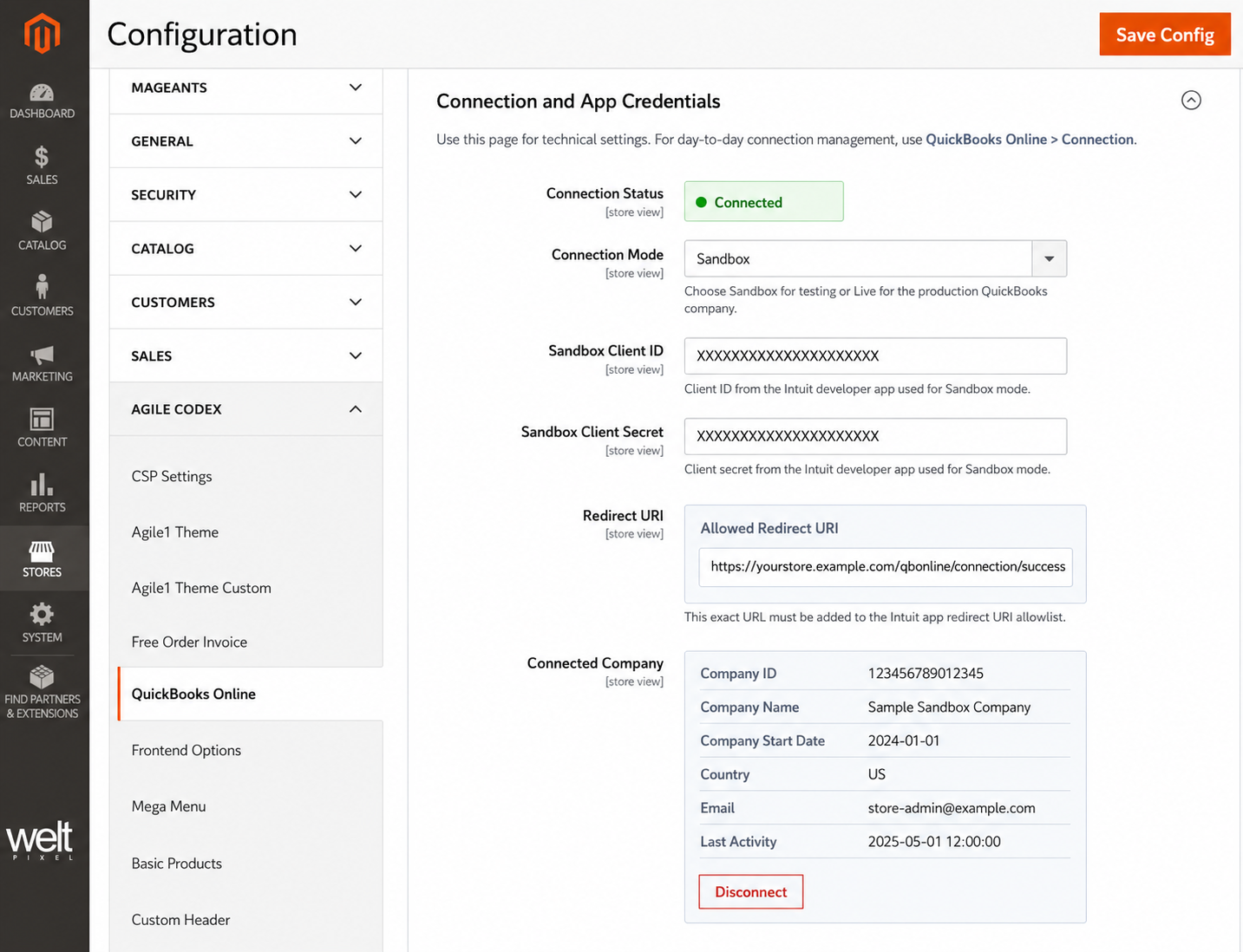
Administrators can easily identify whether QuickBooks Online is connected or disconnected. This helps reduce confusion during setup, testing, reconnection, or support troubleshooting.
- Disconnected State: Shows that the QuickBooks app still needs authorization.
- Connected State: Confirms that Magento is authorized with QuickBooks Online.
- Reconnect Flow: Disconnect and reconnect when changing company, mode, or credentials.
SYNC QUEUE
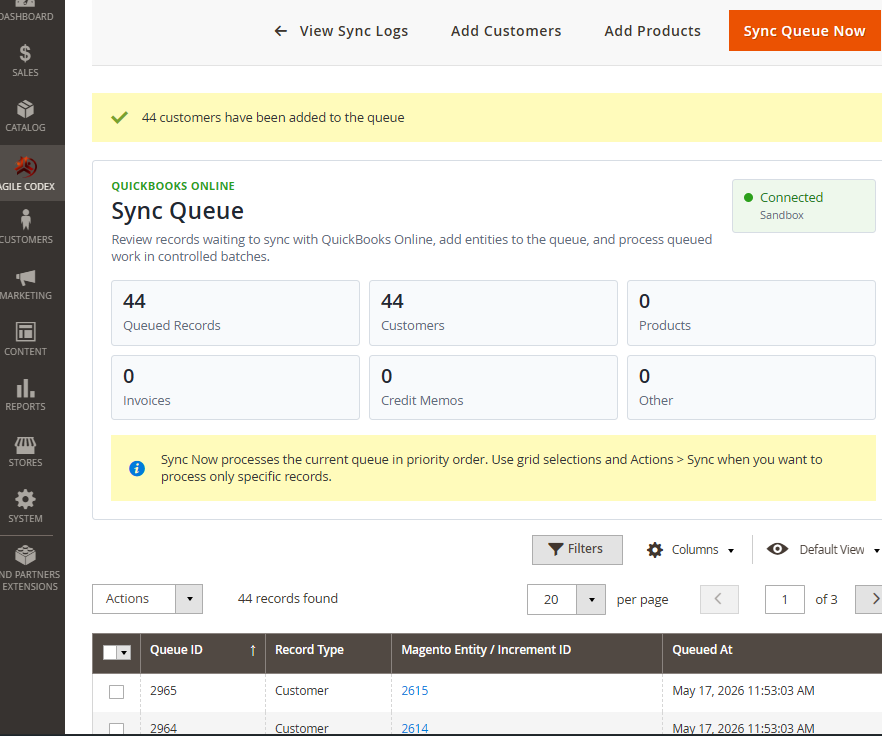
The sync queue helps process QuickBooks API tasks in a controlled way. Instead of forcing every sync action to complete immediately during admin or checkout operations, records can be queued and processed later.
- Background Processing: Queue records for safer synchronization.
- Manual Review: View queued records before or after processing.
- Retry Support: Failed records can be reviewed and processed again.
- Production-Friendly: Helps keep admin actions faster on busy stores.
PAYMENT METHOD MAPPING
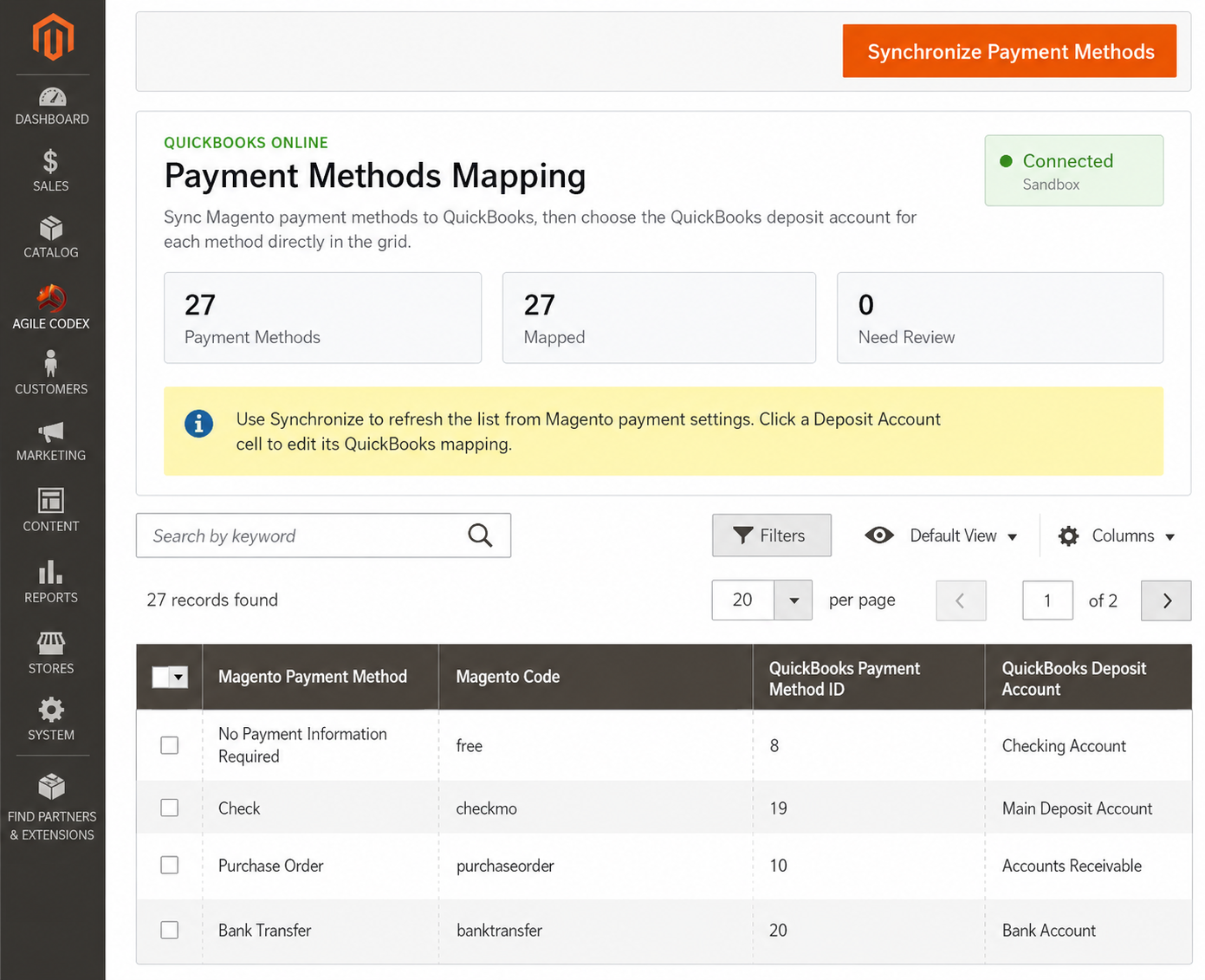
Payment method mapping allows Magento payment methods to be connected with QuickBooks Online payment methods and deposit accounts.
- Magento Payment Methods: Identify available payment methods from the store.
- QuickBooks Payment Methods: Map each method to the correct QuickBooks record.
- Deposit Account Mapping: Choose the QuickBooks account where payments should be posted.
- Accounting Accuracy: Improve how payment information is recorded in QuickBooks.
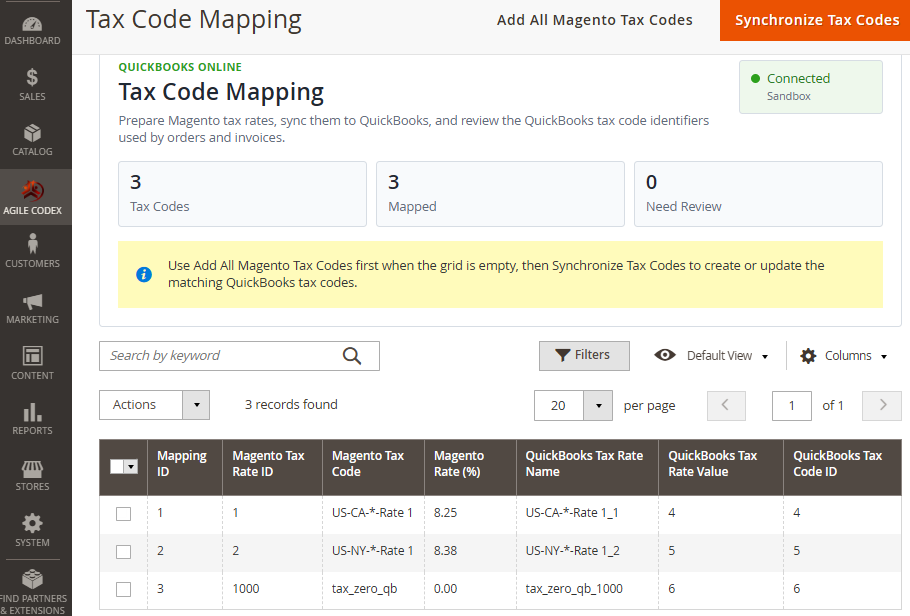
TAX CODE MAPPING
Tax code mapping helps connect Magento tax rates with QuickBooks Online tax codes before syncing orders, invoices, and other financial documents.
- Magento Tax Rates: Add Magento tax rates to the mapping grid.
- QuickBooks Tax Codes: Create or assign matching QuickBooks tax codes.
- Mapped / Unmapped Visibility: Review which tax rules still need setup.
- Cleaner Sales Sync: Reduce tax-code mismatch issues during order and invoice sync.
GENERAL SYNC CONFIGURATION
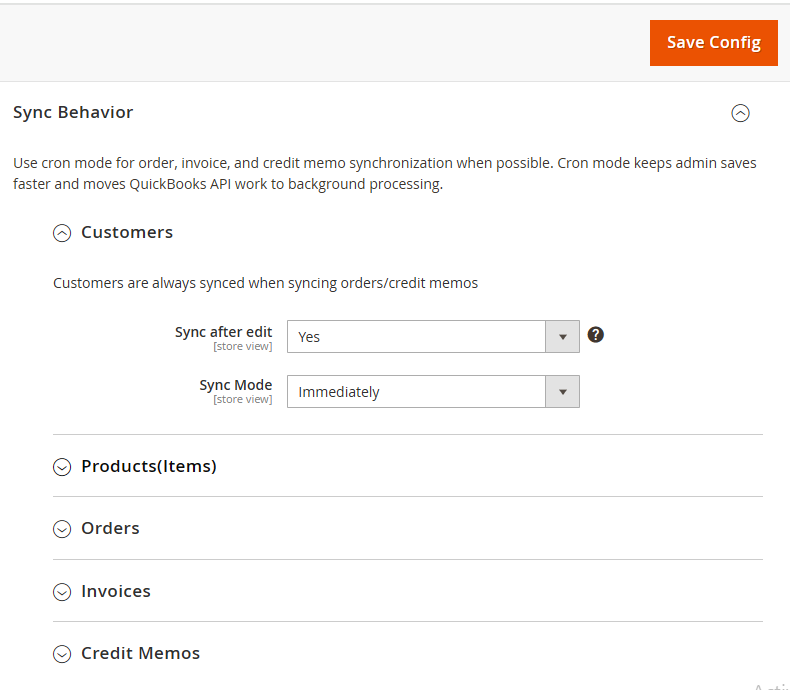
Sync configuration controls how Magento data is prepared and sent to QuickBooks Online. Store owners can choose immediate synchronization for simple workflows or queue/cron-based processing for production stores.
- Customer Sync: Control customer synchronization behavior.
- Product Sync: Prepare Magento products as QuickBooks items.
- Queue or Cron Processing: Move QuickBooks API work into the background.
- Diagnostics: Enable debug logging when troubleshooting integration issues.
ORDER AND INVOICE SYNC SETTINGS
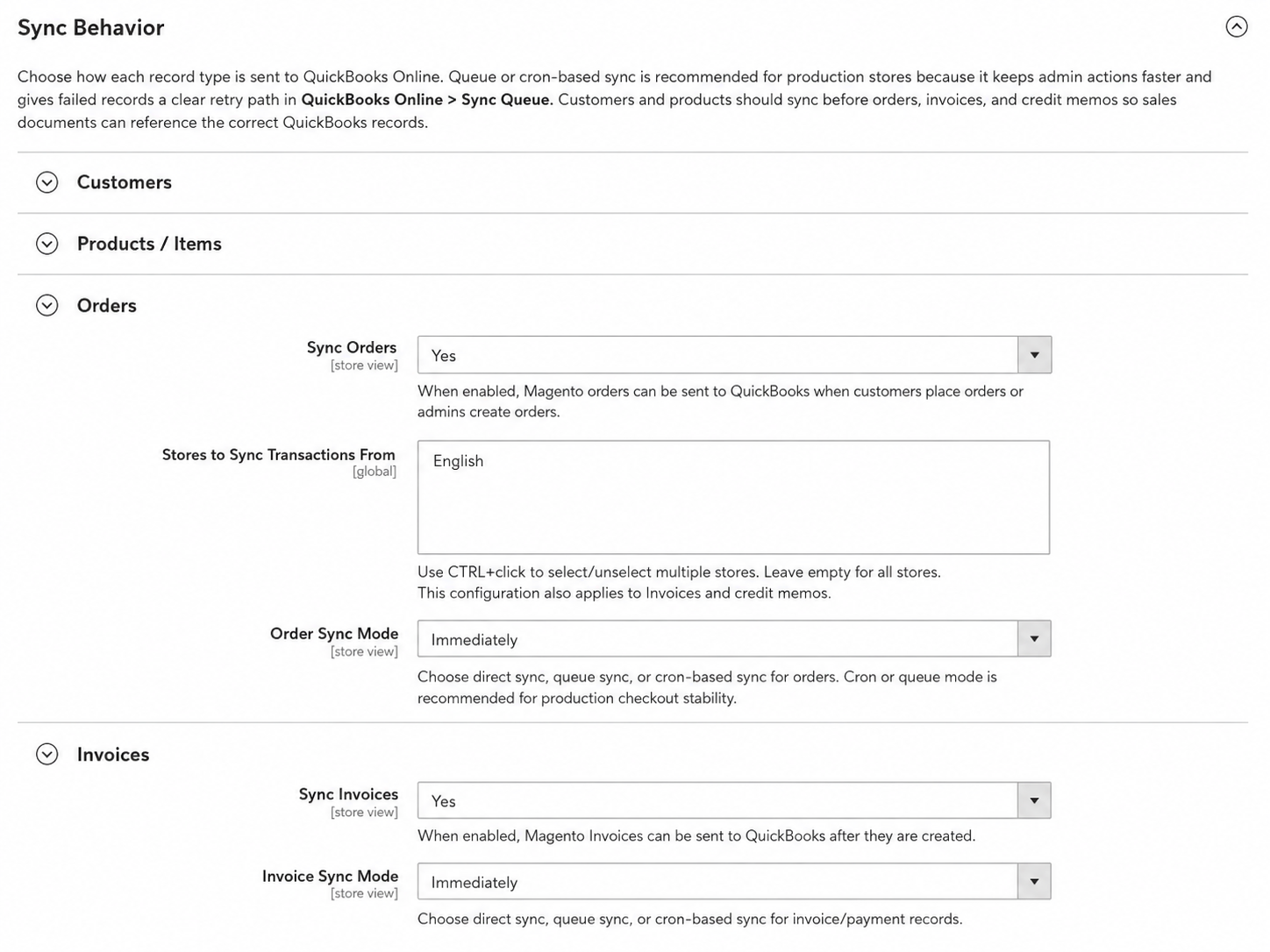
Configure how Magento orders and invoices are synchronized with QuickBooks Online. These settings help control when sales records are sent and whether they should be processed immediately or through the queue.
- Order Sync: Enable or disable order synchronization.
- Invoice Sync: Send Magento invoices to QuickBooks Online.
- Sync Mode: Choose immediate, queue, or cron-based processing.
- Reference Numbers: Use prefixes where needed to avoid document number conflicts.
CREDIT MEMO SYNC SETTINGS
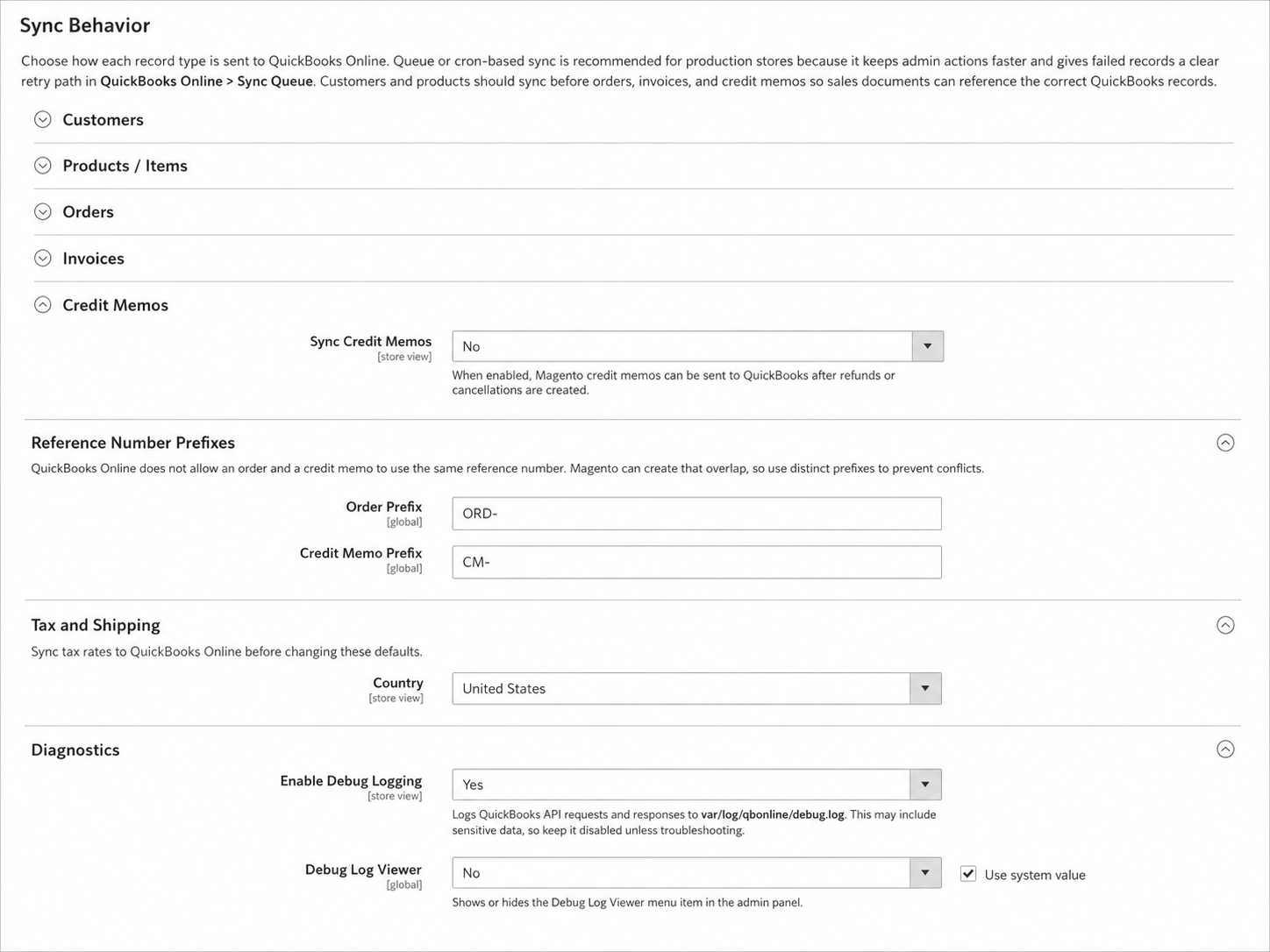
Credit memo synchronization helps send refund-related records from Magento to QuickBooks Online, making it easier to keep ecommerce refunds and accounting data aligned.
- Credit Memo Sync: Enable or disable refund document synchronization.
- Queue Processing: Process credit memo sync safely in the background.
- Reference Prefix: Avoid transaction number conflicts in QuickBooks Online.
- Refund Visibility: Keep refund records traceable between Magento and QuickBooks.
FINAL NOTES
AgileCodex QuickBooks Online Integration helps Magento 2 merchants connect ecommerce operations with QuickBooks accounting through structured sync, mapping tools, queue processing, and admin visibility. It is useful for stores that want to reduce manual accounting entry and maintain better control over QuickBooks Online synchronization.